

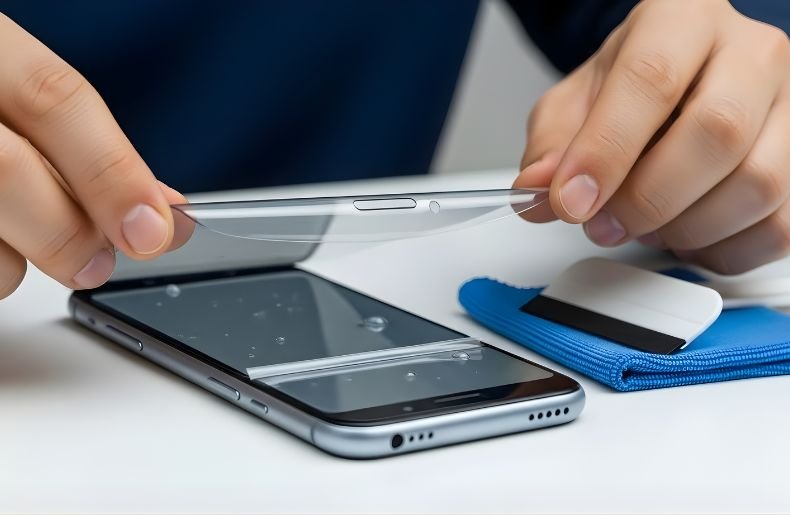
How to apply screen protector without bubbles can help keep your phone screen safe and looking new. Many people find small air pockets or dust under the protector very frustrating. Knowing the right way to put on a screen protector makes it easy to get a smooth and clear finish.
In this guide, you will see step-by-step instructions, tips, and tricks to avoid bubbles, dust, or misalignment. Whether you use a tempered glass protector or a thin plastic film, these steps make installation simple and quick. Following these tips will give your device a clean and polished look every time.
Types of Screen Protectors
Choosing the right screen protector matters a lot. Not all protectors are the same. Some are thicker, some are thinner, and each type has its own benefits. Knowing the differences helps you pick one that is easy to apply and protects your device well. The two most common types are tempered glass and plastic film.
Tempered Glass Screen Protectors
Tempered glass protectors are strong and thick. They feel like the phone’s original screen. These protectors resist scratches and cracks better than thin plastic.
They also give a smooth touch when you swipe or type. Tempered glass is easier to apply without bubbles, especially if you follow the right steps. It is perfect for people who want strong protection and a clear screen.
Plastic Film Screen Protectors
Plastic film protectors are thin and flexible. They are less visible and lighter than tempered glass. However, they scratch more easily. They can also trap small air bubbles if not applied carefully. Many people like plastic films because they are cheap and easy to replace. Plastic protectors work well for screens that already have minor scratches, as they hide small marks.
Pros and Cons of Each Type
| Type | Pros | Cons |
| Tempered Glass | Strong and durable. Smooth touch like the original screen. Easy to apply without bubbles | Slightly thickerUsually more expensive |
| Plastic Film | Thin and light. Cheaper and easier to replace. Hides minor scratches | Scratches more easily. Can trap air bubbles if not applied carefully |
Tools and Materials You’ll Need
Having the right tools and materials makes applying a screen protector much easier. Without them, even a tempered glass protector can trap bubbles or dust. Using simple items ensures a smooth, clear finish every time. Most of these tools are small, easy to use, and often come with the screen protector itself. Preparing them before you start saves time and frustration.
Essential Tools
- Microfiber Cloth: A microfiber cloth is soft and cleans the screen without scratching it. Wipe the screen in small circles to remove fingerprints and dirt.
- Alcohol Wipe: An alcohol wipe helps remove oils and stubborn dirt. It makes the screen completely clean for a bubble-free application.
- Dust Removal Stickers: Dust is the main reason bubbles appear under a screen protector. Use dust stickers to pick up tiny particles you cannot see.
- Applicator Card or Squeegee: This tool helps press the protector down and remove small bubbles. Move it gently from the center outward.
Optional Tools
- Guide Frame or Alignment Tool: Some screen protectors come with a frame to help place the protector exactly in the right position. It reduces mistakes and ensures the edges line up perfectly.
- Small Light Source: A bright light or lamp can help spot dust or tiny bubbles before you press the protector completely.
Having all these tools ready makes installation simple, fast, and reliable. With them, you can apply any screen protector smoothly, whether it’s tempered glass or plastic film.
Step-by-Step Guide to Applying a Screen Protector Without Bubbles
Applying a screen protector can feel tricky, but it does not have to be. The key is preparation and patience. With the right steps, you can avoid bubbles, dust, and misalignment.
Whether you are using a tempered glass screen protector or a thin plastic film, following these instructions makes the process simple. Taking your time ensures a clean and clear finish that looks professional.
Step 1: Clean Your Hands and Workspace
Start by washing your hands thoroughly. Oils or dirt on your fingers can cause bubbles. Next, choose a clean, dust-free area. Avoid rooms with fans or open windows where particles can float onto the screen. A calm workspace reduces the chance of dust settling on the screen during application.
Step 2: Clean the Screen Properly
Use an alcohol wipe to remove oils and grime. Wipe in small circles until the screen is completely clean. Follow with a microfiber cloth to dry the screen and remove any streaks. Check the surface under a bright light to ensure no dust particles remain. Use dust removal stickers for specks that you might not see.
Step 3: Align the Protector
Before removing the backing, hold the protector above the screen to check alignment. Make sure it lines up with edges, buttons, and camera holes. Some protectors include a guide frame to make this step easier. Proper alignment at this stage reduces mistakes and ensures a smooth fit.
Step 4: Peel and Apply Carefully
Slowly peel off the backing from the screen protector. Avoid touching the adhesive side. Let the protector fall naturally onto the screen. Start from one edge and gradually lower it. This helps prevent air pockets from forming.
Step 5: Remove Air Bubbles
Use an applicator card or squeegee to press out small bubbles. Move from the center outward in gentle strokes. Tiny bubbles may disappear after a few hours, but larger ones can be pushed toward the edges. Avoid pressing too hard to prevent cracking tempered glass protectors.
Step 6: Final Touches
Check the edges and corners. Make sure the protector is secure and smooth. Wait a few minutes before placing a case on the device. This gives the adhesive time to settle for a long-lasting bubble-free finish.
Tips for a Perfect Bubble-Free Application
Applying a screen protector without bubbles is easier when you follow a few key tips. Small mistakes can cause dust or air pockets, but these tricks make the process smoother. Whether you use tempered glass or plastic film, these tips will help you get a clean, clear finish every time.
Choose a Dust-Free Environment
Pick a clean and calm area to apply the protector. Avoid rooms with fans, open windows, or carpets where dust can float. Even a speck can create bubbles under the screen protector.
Take Your Time
Rushing the process often leads to mistakes. Slowly align the protector and peel the backing carefully. One careful application is better than repositioning multiple times.
Use All the Tools
Microfiber cloths, alcohol wipes, dust stickers, and applicator cards are not optional. Each tool has a role. Clean the screen fully, remove every tiny dust particle, and press bubbles gently from the center outward.
Handle Protector Properly
Avoid touching the adhesive side. Oils from fingers can trap dust or cause bubbles. Hold the edges carefully and let it fall naturally onto the screen.
Final Check
After applying, press gently on the edges. Make sure there are no loose corners or small bubbles. Most tiny bubbles disappear after a few hours. Avoid putting a phone case on immediately if the edges need time to stick.
Common Mistakes to Avoid
Even small mistakes can ruin a screen protector installation. Knowing what to avoid helps you achieve a smooth, bubble-free finish. These common errors happen to many people but are easy to prevent with careful steps.
- Touching the Adhesive Side: One of the most common mistakes is touching the sticky side of the protector. Finger oils can leave smudges or attract dust. Always hold the edges when aligning and lowering the protector onto the screen.
- Skipping Screen Cleaning: Not cleaning the screen properly is another frequent issue. Even tiny dust particles can create bubbles under the protector. Use an alcohol wipe, a microfiber cloth, and dust removal stickers to make sure the screen is spotless.
- Rushing the Process: Applying the protector too quickly often causes misalignment or trapped air. Take your time, align carefully, and lower the protector slowly. One careful attempt is better than multiple repositionings.
- Ignoring Bubbles: Some people ignore small bubbles, thinking they will go away on their own. While tiny bubbles may disappear, larger ones can remain and affect touch sensitivity. Use an applicator card or squeegee to press bubbles from the center outward.
- Using the Wrong Protector: Using a protector that does not fit your device correctly can also cause bubbles or peeling. Always choose a protector that matches your device model and type, whether it is tempered glass or plastic film.
Avoiding these mistakes ensures a professional-looking, bubble-free installation. With careful preparation and attention, your screen will stay smooth, clear, and protected.
Alternative Methods or Hacks
Sometimes applying a screen protector can be tricky. Even when you follow all the steps, tiny bubbles or dust may appear. These alternative methods and hacks can help make the process easier and give a smooth, clear finish.
Using a Credit Card or Applicator
If small bubbles appear after applying the protector, use a soft credit card or the applicator card. Move it gently from the center toward the edges. This helps push out air pockets without damaging the screen protector.
Using Liquid Solutions (Plastic Protectors Only)
Some plastic film protectors work well with a small amount of water or liquid solution. Lightly dampen the adhesive side and carefully place it on the screen. The liquid allows you to slide the protector slightly to adjust alignment. Once it dries, the film sticks smoothly without bubbles. This method is not recommended for tempered glass protectors.
Using a Bright Light
A strong light or lamp helps spot tiny dust particles or small bubbles. Shine it across the screen while applying the protector. You can quickly remove dust with a sticker or press out bubbles with an applicator card.
Reapplying if Necessary
If the protector is misaligned or trapped dust creates stubborn bubbles, it is okay to lift the protector slowly and reposition it. Doing this carefully prevents tearing or stretching the edges.
These hacks are helpful for tricky situations and make screen protector installation much easier. Combining these methods with careful cleaning and alignment ensures your device stays bubble-free and looks perfect.
Conclusion
Applying a screen protector without bubbles is easy when you follow the right steps. Cleaning the screen, using the right tools, and taking your time make a big difference.
Whether you use a tempered glass or a plastic film protector, proper alignment and careful handling prevent air pockets and dust. Small hacks like using an applicator card or checking with a bright light can help with tricky spots.
Remember, patience and attention to detail are the keys to a smooth, clear finish. With these tips, your device will stay protected, look polished, and feel great every time you swipe or type.
FAQs About Screen Protectors
Many people have questions when it comes to applying or using a screen protector. These FAQs answer common concerns and help ensure a smooth, bubble-free experience.
Can I Remove Bubbles After Applying?
Yes, small bubbles can often be removed using a soft applicator card or a credit card. Move gently from the center toward the edges. Tiny bubbles may disappear after a few hours as the adhesive settles.
How Long Should I Wait Before Using a Phone Case?
It is best to wait a few minutes before putting a case on your device. This allows the screen protector to settle properly and stick fully, especially at the edges.
Do All Screen Protectors Bubble Easily?
No, bubbles are mostly caused by dust, oils, or misalignment. Tempered glass protectors are less likely to bubble if applied carefully. Plastic film protectors may need extra attention, especially in dusty environments.
Can I Reapply a Protector if I Make a Mistake?
Yes, most protectors can be lifted carefully and repositioned. Always make sure the screen is clean and free of dust before reapplying.
Are Tempered Glass Protectors Better Than Plastic Film?
Tempered glass is stronger and feels closer to the phone’s original screen. Plastic film is thinner and cheaper, but it scratches more easily. Both types can be applied without bubbles if the correct steps are followed.
