

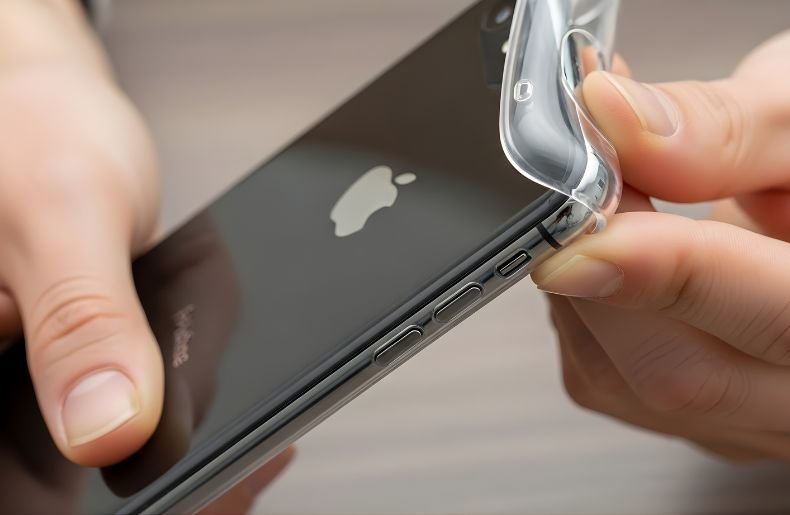
Removing an iPhone case might seem straightforward, but doing it incorrectly can lead to scratches, bent corners, or even damage to your device’s buttons and ports. Whether you’re switching to a new case, cleaning your phone, or accessing the SIM card slot, knowing the proper technique matters.
Different case materials from silicone covers to hard plastic shells require specific approaches to ensure safe removal Phone case. This comprehensive guide will walk you through the best methods How to Remove Phone Case From iPhone without causing any harm, along with troubleshooting tips for those stubborn cases that just won’t budge.
You’ll learn professional techniques that protect both your phone and your case, ensuring everything stays in pristine condition.
Why Proper Case Removal Matters

Your iPhone represents a significant investment, and the last thing you want is to damage it while trying to remove a protective case. Many people underestimate the importance of proper removal techniques, leading to unnecessary wear and tear.
When you forcefully pry off a case from the wrong angle, you risk scratching the aluminum or glass surface, damaging the camera lens, or even bending the device itself, especially with larger models like the iPhone Pro Max. The button mechanisms on your iPhone are surprisingly delicate.
Aggressive case removal can push buttons inward or damage the power button and volume controls, leading to functionality issues down the line. Additionally, modern iPhones feature precision-engineered edges and corners that can chip or dent if metal or hard plastic cases are yanked off carelessly. Understanding the correct removal process protects your device’s resale value and maintains its aesthetic appeal.
Understanding Different iPhone Case Types
Before learning how to remove phone case from iPhone, it’s essential to identify what type of case you’re dealing with. Silicone and rubber cases are flexible and grip your phone tightly, making them resistant to accidental slips but sometimes challenging to remove. These cases typically wrap around all edges and require a peeling motion rather than a pulling one.
Hard plastic or polycarbonate cases usually consist of two pieces or a snap-on design that clicks into place around your iPhone’s perimeter. These cases are generally easier to remove but require attention to avoid cracking. Leather and wallet cases often combine a hard shell with a leather exterior and may include card slots, requiring a different removal approach. Heavy-duty protective cases like OtterBox or LifeProof feature multiple layers, including inner sleeves and outer shells, each requiring separate removal steps.
Step-by-Step: How to Remove Phone Case From iPhone
Step 1: Find the Right Starting Point Begin at one of the bottom corners of your iPhone, either near the charging port or speaker grills. These areas typically have slightly more flexibility in the case material.
Step 2: Create Initial Separation Gently push your thumbnail or a plastic pry tool between the case edge and your iPhone’s corner. Avoid using metal tools, as they can scratch your device. Apply steady, gentle pressure to create a small gap.
Step 3: Peel the Case Away Once you’ve established a gap, slowly peel the case away from the corner, working your way up the side. Think of it like peeling a sticker—steady and controlled rather than quick and forceful.
Step 4: Work Around the Edges Continue peeling along the edges, moving to the adjacent corner. The case should gradually release from your iPhone. If you encounter resistance, don’t force it return to the previous corner and ensure it’s fully separated.
Step 5: Remove the Final Edges Once three corners are free, the fourth corner and remaining edges should come off easily. Gently flex the case away from your phone to complete the removal.
Removing Hard Shell and Snap-On Cases

Hard cases require a different technique since they don’t flex like silicone. Start by identifying whether your case is a one-piece or two-piece design. For one-piece snap-on cases, locate the seam where the case wraps around your iPhone’s edges. Position your iPhone face-down on a soft, clean surface like a microfiber cloth to protect the screen.
Begin at one of the top corners, gently pressing down on the back of your iPhone while pulling the case edge away from the corner. You should hear a soft click as the case unsnaps. Move to the adjacent corner and repeat this process. The key is working diagonally once two opposite corners are free, the remaining corners release with minimal effort. Never attempt to slide the case off lengthwise, as this can damage your phone’s buttons or bend the case itself.
For two-piece cases, start by removing the front bezel or bumper first, then slide the back plate away from your device. These Phone case usually have specific release points or clips that need to be disengaged before the case will separate from your iPhone.
Quick Comparison: Case Types and Removal Difficulty
| Case Type | Difficulty | Risk Level |
| Silicone | Easy | Low |
| Leather | Medium | Low |
| Hard Plastic | Medium | Moderate |
| Rugged Multi-Layer | Hard | Higher |
How to Remove Phone Case from iPhone: Dealing with Tight-Fitting Cases
Sometimes cases become incredibly snug due to temperature changes, dust accumulation, or simple wear. When facing a particularly stubborn case, patience becomes your greatest asset. Warming the case slightly can make rubber and silicone materials more pliable—hold your encased iPhone in your hands for a few minutes, or place it in a warm (not hot) area.
The gentle heat causes the material to expand slightly, making removal easier. For cases that absolutely won’t budge, consider using dental floss or thin fishing line as a non-damaging separation tool. Slide the floss between the case and phone at a corner, then work it around the edges like a saw.
This technique works exceptionally well with tight silicone Phone case . Another professional trick involves using small plastic cards, similar to guitar picks, which can slide between the case and phone without causing scratches. Always work slowly and deliberately rushing the process causes more problems than it solves.
Special Considerations for Wallet and Battery Cases
Wallet cases present unique challenges because they often include magnetic closures, card slots, and folio covers. Begin by opening the wallet portion completely and removing any cards or cash. Most wallet cases attach via a hard shell that adheres to your iPhone’s back. Focus on removing this inner shell first using the hard case techniques mentioned earlier.
Some designs use adhesive, which requires gentle, steady pulling to separate without leaving residue. Battery cases require extra caution due to their electronic components and charging mechanisms. Always ensure the battery case is powered off and disconnected from any charging source.
These cases typically have a two-part removal system: first, you’ll slide out the top portion that surrounds the camera and upper edge, then remove the main body. Check your battery case’s specific instructions, as forcing these Phone case can damage both the case’s internal circuitry and your iPhone’s lightning port or charging coil.
Common Mistakes to Avoid
One of the biggest errors people make is using excessive force when learning how to remove phone case from iPhone. If a case isn’t coming off easily, something’s wrong with your technique not the case. Forcing it leads to cracked cases, damaged phone corners, or bent devices.
Similarly, using metal tools like knives or screwdrivers might seem efficient, but they create scratches, dents, and chips that permanently mar your iPhone’s finish. Another frequent mistake involves removing cases in the wrong environmental conditions. Attempting to remove a cold, stiff case immediately after coming inside from winter weather often results in case cracking.
Allow your phone to reach room temperature first. People also commonly forget to remove attached accessories like pop sockets, ring holders, or kickstands before attempting case removal, which can prevent proper separation and damage both the accessory and case.
Maintaining Your iPhone Case for Easy Removal
Regular maintenance makes future removals significantly easier. Clean your case monthly by removing it completely and washing it with mild soap and water (for waterproof materials). This prevents dust and debris from building up in the edges, which can make cases grip more tightly over time.
For leather Phone case, use appropriate leather conditioner to keep the material supple. Inspect your case regularly for signs of wear, particularly around the corners and button cutouts. Cases with cracked corners or stressed material are more likely to break during removal and provide less protection for your device.
If you notice your case becoming increasingly difficult to remove, it might be time for a replacement. Quality cases should maintain their shape and flexibility throughout their lifespan, making removal consistently straightforward.
When to Seek Professional Help
If you’ve tried multiple techniques and your Phone case simply won’t budge, or if you notice any signs of damage beginning to occur during your removal attempts, stop immediately. Visit an Apple Store or authorized service provider where technicians have specialized tools and experience with stubborn cases. This is particularly important for expensive phones or limited-edition cases where replacement costs are significant.
Professional help is also advisable if your case has somehow damaged your iPhone during installation or if you suspect adhesive damage. Technicians can safely remove cases that have become essentially permanent fixtures and assess any potential damage to your device. The small service fee is worth protecting your investment.
Final Thoughts
Mastering how to remove phone case from iPhone protects your device from unnecessary damage while extending the life of your Phone case. Whether you’re dealing with flexible silicone, hard plastic shells, or specialized wallet cases, the key principles remain consistent: start at the corners, work gradually around the edges, never force the removal, and use appropriate tools.
By understanding your specific case type and following the proper technique, you can safely remove and replace your iPhone case whenever needed without stress or damage. Remember that patience and gentle pressure always trump brute force.
Take your time, warm stubborn cases if necessary, and don’t hesitate to seek professional assistance when needed. Now that you’re equipped with these expert techniques, you can confidently protect your iPhone during every case change. Ready to try a new case style? Put these methods into practice and enjoy worry-free case swapping!
