

You’re cruising down the streets, hair blowing in the wind, when you feel it: that nagging sensation reminding you to check your battery percentage. Not only is it convenient, knowing how to check what percentage your electric scooter is can be incredibly important for avoiding getting stranded miles from home.
If you’re a daily commuter or a weekend warrior, knowing your Electric Scooter battery percentage gives you the power to plan routes, control charging habits, and maximize your battery life. Today’s e-scooters have various options to check their battery life, ranging from digital displays to smartphone apps.
This guide will take you through every method, so you won’t be caught off-guard by a dead battery in the future.
How to Check What Percentage Your Electric Scooter Is Using Built-In Displays

Most Electric Scooter come equipped with some form of visual battery indicator. Understanding these displays is your first line of defense against unexpected power loss.
Reading LED Battery Indicators
The simplest Electric Scooter battery monitoring system uses LED lights. Typically, you’ll see four or five bars that light up to show your charge level. Each bar usually represents 20-25% of your total battery capacity.
When all lights are illuminated, you’re at or near 100%. As you ride, lights will dim or turn off sequentially.
Here’s what different LED patterns typically mean:
- All lights on: 75-100% charge
- Three lights: 50-75% charge
- Two lights: 25-50% charge
- One light flashing: Below 20%, charge immediately
- Red light: Critical battery level, find a charger now
Some scooters use color-coded systems where green indicates good charge, yellow warns of medium levels, and red signals urgent charging needs. Familiarize yourself with your specific model’s indicator system by checking the manual, as patterns can vary between manufacturers.
Interpreting Digital LCD Screens
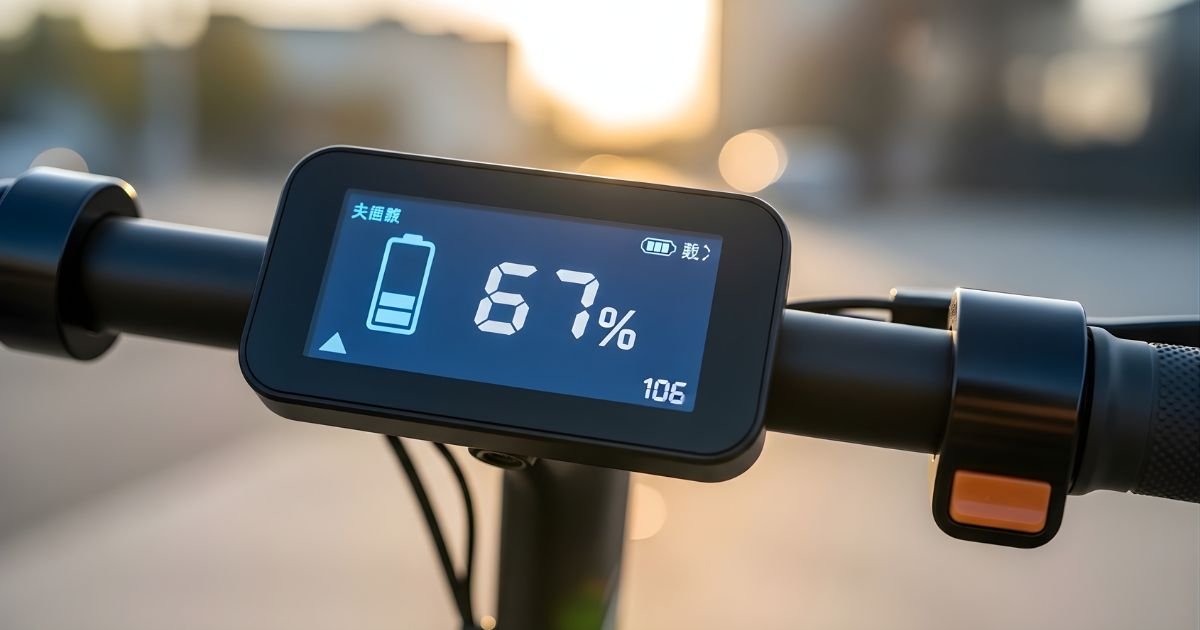
The digital display is more accurate in terms of telling you the Electric Scooter battery percentage compared to LED bars. These screens usually display an exact percentage, which makes it easier to get a good feel for what rides you can take. A “73%” indicator is much more informative than three out of four illuminated bars.
Most LCD screens also show other Electric Scooter battery stats such as voltage, current speed, total distance traveled, and projected range.
This information assists you in determining if you can reach your destination or need to return home to recharge halfway. Some advanced displays will even tell you what your battery temperature is, because that is one of the factors determining how well your battery works and how long it lasts.
For those of you with screens that indicate voltage, and not percentage, make sure you know the full voltage rating of your Electric Scooter battery. A 36V battery reading between 38-42V is fully charged, while 36V means the battery is almost dead. For 48V batteries, full is 54.6V and empty is 48V. If you can only see the voltage readings on your display, have a cheat sheet ready.
How to Check What Percentage Your Electric Scooter Is Through Mobile Apps
Modern electric scooters often connect to smartphone apps that provide detailed battery information and management features. This method offers the most comprehensive view of your battery’s health and status.
Connecting Your Scooter to Manufacturer Apps
Most major Electric Scooter brands offer dedicated mobile applications that pair with your vehicle via Bluetooth. Once connected, these apps display real-time battery percentage with far greater accuracy than basic displays. They often show the exact percentage down to single digits, eliminating guesswork.
Beyond simple percentage readings, these apps typically provide battery health metrics, charging history, and usage patterns. You can track how quickly your Electric Scooter battery drains under different conditions, monitor charging cycles, and receive maintenance reminders. Some apps even offer GPS tracking, ride statistics, and firmware updates that optimize battery performance.
To connect your scooter, download the official app from your manufacturer, enable Bluetooth on your phone, and follow the pairing instructions. Keep the app updated to ensure you’re getting the most accurate battery readings and latest features. Remember that app connectivity requires your phone’s Bluetooth to remain active during rides, which does consume some phone battery.
Understanding Advanced Battery Metrics
Mobile apps often display information that goes beyond simple percentage readings. You might see voltage curves, current draw rates, and cell balance information. These metrics help you understand not just how much charge remains, but how healthy your battery actually is.
A battery showing 80% charge might seem fine, but if the app reveals significant voltage sag under load or uneven cell distribution, it could indicate underlying issues. Regular monitoring of these advanced metrics helps you catch problems early before they leave you stranded. You’ll notice patterns like faster drainage in cold weather or after certain numbers of charge cycles.
Some apps provide predictive range estimates based on your riding style, terrain, and current battery condition. This feature is invaluable for planning longer trips. The app learns from your habits and adjusts its estimates accordingly, becoming more accurate over time. Take advantage of these insights to maximize your riding experience and battery longevity.
Alternative Methods to Verify Battery Percentage
Sometimes your display malfunctions or you want to double-check the reading. Having backup methods ensures you’re never completely in the dark about your battery status.
Using a Multimeter for Voltage Checks
When digital displays fail or seem inaccurate, a multimeter provides the most reliable way to check your battery’s actual charge level. This method requires basic tools and knowledge but delivers precise results. Set your multimeter to DC voltage mode and touch the probes to your battery terminals—red to positive, black to negative.
Compare your reading to the battery’s specifications. For instance, a fully charged 36V lithium battery typically reads around 42V, while 36V indicates it’s essentially empty. For 48V systems, expect 54.6V when full and 48V when depleted. Create a simple reference chart and keep it in your phone or scooter bag for quick checks.
This method is particularly useful for older scooters with unreliable displays or when buying used equipment. It reveals the true battery condition, not just what the display claims. However, always exercise caution when handling battery terminals to avoid short circuits or electric shock.
Monitoring Performance Indicators
Even with no working displays, your scooter can still inform you about battery percentage based on how it behaves. See how much acceleration varies as the battery runs down. A scooter with a full charge has a greater reaction to the throttle, while an empty battery is slow and weak on hills.
You’ll also want to note the speed you can sustain. As the battery percentage falls, top speed is generally throttled to save some of the remaining charge. If you see your normal cruising speed start to lessen even though the terrain is flat, that tells you your battery will need charging soon. Some scooters also limit power output to the motor when battery levels dip below specific points.
Listen for strange noises or vibrations you didn’t hear before the battery was worn. It’s common of symptoms from low voltages. Although these methods are not as accurate as a digital readout, they offer a great way to monitor your battery’s real-world state of charge during rides.
Maintaining Accurate Battery Percentage Readings
Keeping your battery monitoring systems accurate requires regular maintenance and proper charging habits. Calibration ensures your display shows true percentage levels rather than optimistic or pessimistic estimates.
Calibrating Your Battery Display
Over time, battery percentage displays can become inaccurate, showing 30% when you actually have 50% or vice versa. This happens because the battery management system loses track of the battery’s true capacity through charge cycles. Calibration resets this system to match actual performance.
To calibrate, fully charge your scooter to 100%, then ride it until the battery completely depletes and the scooter shuts off automatically. Don’t force it to continue running on empty, as this damages the battery. Once fully drained, charge it back to 100% without interruption. This complete cycle helps the battery management system recalibrate its percentage calculations.
Perform this calibration every two to three months for optimal accuracy. However, avoid making it a regular riding pattern, as constantly draining batteries to zero reduces their overall lifespan. Use calibration strategically when you notice significant discrepancies between displayed percentage and actual performance.
Best Practices for Battery Health
Battery care goes beyond the percentage gadget. These all-in-one screens are great and all, but you get to see a lot more in your battery app or system monitor than just how far you’ve drained it. Keep your scooter away from hot or cold temperatures.
Only use the charger that came with your Electric Scooter battery, as other chargers may overheat and destroy battery cells or display false percentages. Always charge your scooter with adequate space and away from anything flammable in a dry environment. Do not leave it charging overnight or unattended or for overextended periods of time.
Maintain Electric Scooter charging ports and battery contacts. Clean charging ports and the Electric Scooter battery contacts for proper electrical connections as well as readings. Occasionally, check the condition of your battery for swelling or excessive heat.
If your percentage reading becomes significantly erratic and calibration does not correct the problem, then you may need to have the Electric Scooter battery inspected for replacement by a professional.
Conclusion
Knowing how to check what percentage your electric scooter is empowers you to ride with confidence and avoid frustrating power failures.
Whether you rely on LED indicators, digital displays, mobile apps, or manual voltage checks, understanding these methods ensures you always know your battery status. Regular calibration and proper maintenance keep your readings accurate and your battery healthy for years of reliable service.
Start implementing these monitoring techniques today, and make battery management a natural part of your riding routine. Your future self will thank you when you never face the panic of wondering if you’ll make it home again. Ready to master your Electric Scooter battery life? Check your percentage now and plan your next ride with complete confidence!
