

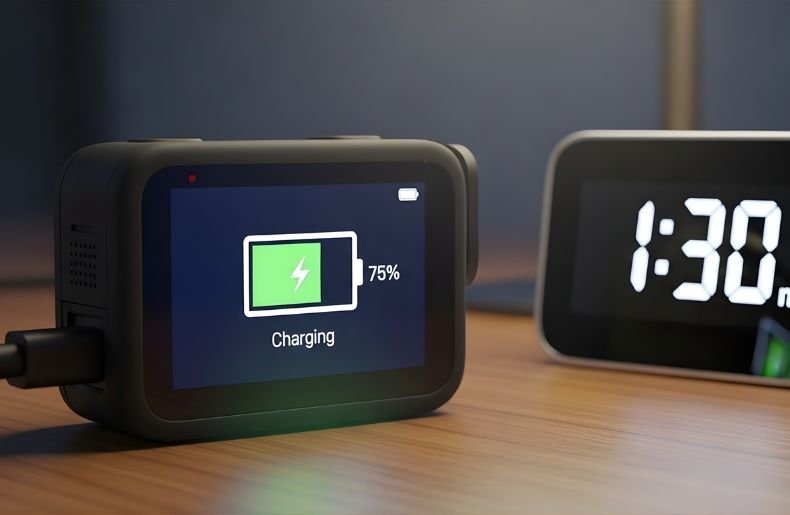
If you’ve just unboxed your new GoPro or you’re planning an adventure tomorrow, you’re probably wondering: how long does a GoPro take to charge? The answer isn’t as straightforward as you might think. Depending on your GoPro model, charging method, and battery condition, charging times can vary from 1 to 3 hours.
Understanding these variables will help you plan your shooting schedule better and avoid the frustration of a dead battery when you’re about to capture that perfect moment. In this guide, I’ll walk you through everything you need to know about GoPro Take to Charge times, the factors that affect them, and practical tips to keep your camera ready for action.
Understanding GoPro Charging Times by Model
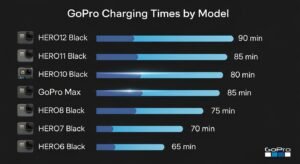
Different GoPro models come with different battery capacities, which directly impacts how long they take to charge. The newer your GoPro, the larger the battery, and generally, the longer the charging time.
GoPro HERO12 and HERO11 Black
The latest flagship models feature 1720mAh Enduro batteries that typically take about 2 hours to fully charge using a standard USB-C cable connected to a 5V/2A power adapter. If you’re using the Dual Battery Charger with a higher amperage adapter (5V/3A), you can reduce this time to approximately 90 minutes. These models support fast charging, which makes a noticeable difference when you’re in a hurry.
GoPro HERO10 and HERO9 Black
Both the HERO10 and HERO9 use 1720mAh batteries and require roughly 2 hours for a complete charge with standard charging equipment. However, the HERO10 benefits from improved charging efficiency, sometimes shaving off 10-15 minutes compared to the HERO9 when using optimal charging conditions.
Older GoPro Models (HERO8, HERO7, and Earlier)
Earlier models like the HERO8 Black and HERO7 Black have smaller 1220mAh batteries, which means they charge faster—typically within 1.5 to 2 hours. The HERO5 and HERO6 models follow similar charging patterns, though the actual time can vary based on the charging source you’re using.
Factors That Affect How Long a GoPro Takes to Charge
Several variables can impact your GoPro’s charging speed, and understanding these will help you optimize your charging routine.
The power source you choose makes a significant difference in charging times. A wall adapter with higher amperage output will charge your GoPro Take to Charge faster than a computer USB port. While a standard computer USB port outputs about 0.5A to 1A, a dedicated wall charger can provide 2A to 3A, cutting your charging time substantially.
Similarly, using a power bank while traveling might result in slower charging if the power bank has a low output rating. The quality and condition of your USB cable also matters more than most people realize. A damaged or low-quality cable can restrict power flow, extending charging times or even preventing your GoPro from charging properly.
Always use the original cable that came with your GoPro Take to Charge or a certified replacement to ensure optimal performance and safety. Temperature plays a crucial role in charging efficiency that many users overlook.
GoPro Take to Charge batteries are lithium-ion batteries designed to charge optimally between 32°F and 104°F (0°C to 40°C). If you’re trying to charge your GoPro in extremely cold conditions, such as during a winter expedition, or in hot environments like inside a car on a summer day,
The charging process will slow down significantly or may not work at all. The camera’s built-in safety mechanisms prevent charging outside safe temperature ranges to protect battery health and longevity.
Battery Health and Age
As your GoPro Take to Charge battery ages, its charging characteristics change. An older battery may take longer to reach full capacity, and it might not hold that charge as long as it once did. If you’ve been using the same battery for over two years with frequent charge cycles, you might notice it takes 20-30 minutes longer to charge than when it was new. This is normal battery degradation, and it’s a sign you might want to consider purchasing a replacement battery.
Step-by-Step Guide: How to Charge Your GoPro Properly
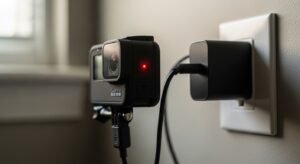
Charging your GoPro correctly ensures optimal battery life and performance. how long does a GoPro take to charge Here’s the proper method:
Step 1: Power Off Your GoPro – While you can charge your GoPro Take to Charge while it’s on, turning it off significantly reduces charging time and allows the battery to charge more efficiently.
Step 2: Connect the USB-C Cable – Insert the USB-C cable into the port on the side of your GoPro Take to Charge . Make sure the connection is firm and secure.
Step 3: Connect to Power Source – Plug the other end into your chosen power adapter or charging device. For fastest results, use a wall adapter rated at 5V/2A or higher.
Step 4: Check the Charging Indicator – The camera’s front display will show a red LED light or a charging icon on the screen, indicating that charging is in progress.
Step 5: Wait for Completion – When the battery is fully charged, the indicator light will turn off or show a full battery icon. Avoid disconnecting before reaching 100% if possible.
Step 6: Disconnect and Store Properly – Once charged, remove the cable and ensure the USB-C port cover is properly sealed to maintain waterproofing.
Here is a general idea based on common models and official battery sizes:
| GoPro Model | Battery Capacity | Typical Full Charge Time |
| HERO9 / HERO10 | 1720 mAh | 1.5 to 2 hours |
| HERO11 / HERO12 | 1720 mAh Enduro | 1.5 to 2.5 hours |
| HERO8 | 1220 mAh | 1.5 to 2 hours |
| Older HERO models | 1160 to 1220 mAh | 2 to 3 hour |
Fast Charging Options for Your GoPro
When time is limited, several strategies can help you charge your GoPro faster and get back to shooting.
Using the Official Dual Battery Charger
The GoPro Dual Battery Charger is purpose-built for efficiency and can charge two batteries simultaneously. With a high-amperage USB adapter (5V/3A), it charges batteries approximately 30% faster than charging inside the camera. This accessory is invaluable for professional users who need multiple fully charged batteries ready at all times. The charger features LED indicators for each battery, so you know exactly when each one is ready to go.
Supercharger and High-Wattage Adapters
GoPro’s Supercharger is designed specifically for fast charging and can reduce charging times by up to 20-40% compared to standard adapters. This wall charger supports multiple USB ports, allowing you to charge your GoPro and other devices simultaneously.
Third-party fast chargers with USB Power Delivery (PD) technology can also work well, but always verify they’re compatible with your specific GoPro model to avoid potential damage.
Quick Charging Tips
If you need a quick power boost rather than a full charge, here are some practical tips. Charging your GoPro Take to Charge for just 30 minutes can give you approximately 50-60% battery capacity, which translates to 30-45 minutes of 4K recording.
Always charge in a cool, well-ventilated area away from direct sunlight. Remove any protective cases or frames during charging to prevent heat buildup. If you’re charging from a laptop, make sure the laptop is plugged into wall power rather than running on its own battery for optimal charging speed.
Common GoPro Charging Problems and Solutions
Even with proper care, you might encounter charging issues. Here’s how to troubleshoot them.
GoPro Won’t Charge at All
If your GoPro isn’t charging, first try a different USB cable and power adapter to rule out faulty accessories. Clean the USB-C port gently with compressed air or a soft brush to remove any debris or moisture. Try a different power outlet to ensure the problem isn’t with your electrical source.
If these steps don’t work, remove the battery, wait 30 seconds, reinsert it, and try charging again—this simple reset often resolves mysterious charging issues.
Extremely Slow Charging
When your GoPro Take to Charge much slower than expected, check your power source amperage rating. A computer USB port or low-powered USB hub simply can’t deliver enough current for efficient charging.
Ensure your charging cable isn’t damaged by trying a known-good cable. Check if firmware updates are available, as GoPro occasionally releases updates that improve charging performance.
Battery Drains Quickly After Charging
If your battery seems to drain faster than normal even after a full charge, several factors could be responsible. Extreme temperatures during use can rapidly deplete battery life. Shooting in high-resolution modes like 5.3K or using features like HyperSmooth stabilization consumes significantly more power.
An aging battery that’s been through hundreds of charge cycles may simply be reaching the end of its usable life and needs replacement.
Maximizing Your GoPro Battery Life
Beyond just knowing how long does a GoPro take to charge, maintaining optimal battery health ensures consistent performance over time.
Don’t leave your GoPro Take to Charge battery completely discharged for extended periods. If you’re storing your camera for weeks or months, charge the battery to about 50% before storage. Avoid exposing batteries to extreme temperatures, both during use and storage.
Use genuine GoPro Take to Charge batteries or certified third-party alternatives rather than cheap knockoffs that can damage your camera. When possible, avoid charging your battery to 100% and immediately draining it to 0% repeatedly—lithium-ion batteries prefer partial charge cycles. Update your GoPro’s firmware regularly, as these updates often include battery optimization improvements.
Final Thoughts
Understanding how long does a GoPro take to charge helps you plan better and never miss important shots. Most modern GoPro Take to Charge models need 1.5 to 2 hours for a full charge, though this varies based on your model, charging method, and environmental conditions.
By using the right charging equipment, maintaining proper battery care, and following the best practices outlined in this guide, you’ll ensure your GoPro Take to Charge is always ready for adventure. Remember that investing in spare batteries and a dedicated charger can eliminate charging anxiety altogether.
Now that you’re equipped with this knowledge, it’s time to charge up and capture amazing footage—your next adventure awaits!
