

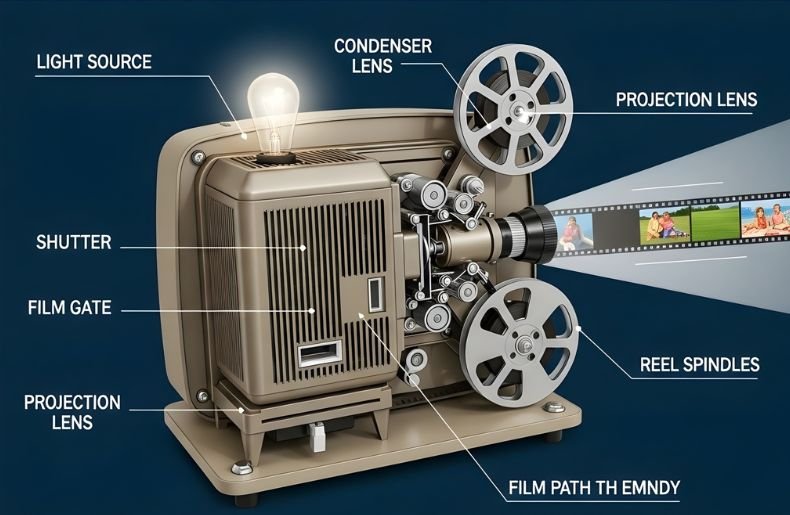
Ever wonder what sorcery occurs inside that streamlined box to turn your living room into a movie theater? How Does a Home Movie Projector Work—And What Should You Look For? Knowing how a home movie projector works isn’t just for nerds; it’s information that can help you make better purchasing decisions, troubleshoot problems, and get more out of your viewing experience.
Today’s home projectors are not only more affordable than ever, but they also offer a clearer picture and better contrast than many of the big screen TVs you’ll find on store shelves.
From the light source that makes the display possible to the complex lens system that brings you a sharp image, every part counts for something. In this guide, we’ll try to demystify home projectors and explain the technology that drives them, as well as various types of projectors, before deep-diving into why they’re such a powerful tool for anyone interested in home entertainment.
The Basic Principle: Light, Image, and Projection
In essence, a home movie projector functions simply by enlarging and projecting a very small picture that has been illuminated with bright light onto a faraway surface. Think of it as a reverse camera — rather than recording light to make a small picture, it emits light to create an enormous one.
The process requires three basic ingredients to work together smoothly: a strong light source, an image chip that generates the picture, and a projection lens that magnifies and focuses it all onto your screen.
The trip starts when electrical signals from your video source are turned into accurate light patterns. Those patterns pass through or bounce off thousands-of-times-a-second-moving microscopic parts, giving the impression of smooth motion and bright colors.
The whole thing takes place so rapidly that your eyes simply see one continuous image instead of being able to notice millions and millions of changes at the pixel level. That basic premise has not changed in the history of Movie Projector, though the technology behind it certainly has.
The Heart of the System: Light Sources Explained
Every projector needs a robust light source to function, and this component significantly impacts image quality, brightness levels, color accuracy, and maintenance requirements. Traditional projectors used metal halide lamps that produced intense white light but required replacement every few thousand hours.
These lamp-based Movie Projector were the standard for years, offering excellent brightness but generating considerable heat and noise from cooling fans.
Modern Movie Projector increasingly use LED technology or laser light sources, which offer substantial advantages.
LED projectors provide longer lifespans—often 20,000 hours or more—lower power consumption, and instant on/off capability without warm-up periods. Laser projectors take this further, delivering exceptional brightness, superior color gamut, and lifespans exceeding 30,000 hours.
Laser light sources maintain consistent brightness throughout their lifetime, unlike lamps that gradually dim, ensuring your picture quality remains stellar for years. The choice of light source affects not just longevity but also the Movie Projector color performance.
Laser and LED systems can be engineered to produce specific wavelengths, enabling wider color ranges that more accurately reproduce the content creator’s vision. This is why premium home theater projectors increasingly adopt these advanced illumination technologies.
Imaging Technology: How Pictures Form
Once the light source generates illumination, the Movie Projector needs a method to create the actual image. This is where imaging technology comes into play, and there are three primary systems used in modern home projectors: LCD, DLP, and LCoS. Each has distinct characteristics that affect picture quality, color reproduction, and overall performance.
LCD (Liquid Crystal Display) Projectors
LCD Movie Projector work by splitting white light into red, green, and blue components using dichroic mirrors. Each color passes through its own LCD panel—a grid of microscopic liquid crystal pixels that either block or allow light through based on the image signal. The three colored images then recombine through a prism before reaching the projection lens.
This technology offers excellent color brightness, sharp images, and typically lower costs. LCD panels provide high light efficiency, meaning you get more brightness per watt of lamp power, making them ideal for rooms with ambient light.
DLP (Digital Light Processing) Projectors
DLP technology takes a completely different approach using a chip covered with millions of tiny mirrors called a Digital Micromirror Device (DMD). Each mirror represents one pixel and can tilt thousands of times per second to reflect light toward or away from the lens.
Most home DLP Movie Projector use a single chip with a spinning color wheel that alternates between red, green, and blue filters. This creates sequential color images that blend together in your perception. DLP projectors are known for smooth motion handling, high contrast ratios, and minimal “screen door effect”—the visible grid pattern sometimes seen with LCD technology.
LCoS (Liquid Crystal on Silicon) Technology
High-end projectors often employ LCoS technology (marketed as D-ILA by JVC or SXRD by Sony), which combines elements of both LCD and DLP systems. LCoS uses liquid crystal panels mounted on reflective silicon backing, offering the smooth pixel structure of DLP with the superior color control of LCD.
The Lens System: Focusing Your Entertainment
The picture that the imaging chip creates moves to the projection lens, which is the last final piece in how a home movie projector works. This optical system magnifies the tiny image from the chip and focusesit very accurately onto your screen.
Projector lenses, in contrast, are sophisticated combinations of several glass elements meticulously mounted to reduce distortion, aberrations, and enhance sharpness across the entire picture.
Zoom allows you to adjust the image size without moving the projector, while lens shift lets you move the picture up or down or left and right, respectively, without geometric distortion (referred to as keystone).
The quality of the lenses also plays a critical role for edge-to-edge sharpness, color and clarity in general — that’s why top-of-the-line projectors have such high-quality lenses. Projection ratio — the distance from the Movie Projector to the projection screen is determined by the lens.
In a nutshell, short-throw models can deliver images big enough for most rooms even when they are really close to the wall or screen (which is ideal for small spaces), while standard throw projectors need more space but can also offer better image quality.
Resolution and Image Quality: Pixels and Performance
When examining how does a home movie projector work, resolution represents one of the most important specifications. This determines how many individual pixels the projector can display, directly affecting image sharpness and detail.
Common resolutions include 1080p (Full HD with 1920×1080 pixels), 4K UHD (3840×2160 pixels), and even 8K in cutting-edge models. Higher resolution means more detail, especially noticeable on larger screens where lower resolutions might appear pixelated.
However, resolution alone doesn’t tell the complete story. Contrast ratio—the difference between the darkest blacks and brightest whites—significantly impacts perceived image quality.
A projector with excellent contrast produces images with depth, shadow detail, and that cinematic “pop” that makes scenes feel three-dimensional. Dynamic contrast systems adjust the light output based on scene content, dimming during dark sequences and boosting brightness for vivid scenes.
Cooling and Ventilation: Keeping Things Running Smoothly
All that light generation creates substantial heat, making thermal management essential to Movie Projector longevity and performance. The cooling system typically employs one or more fans that draw cool air across the light source and imaging components while exhausting hot air.
Proper ventilation prevents overheating that could damage sensitive electronics or reduce lamp life. This is why projectors need adequate clearance around ventilation ports and why you’ll hear fan noise during operation.
Advanced projectors use intelligent thermal management systems that adjust fan speed based on operating temperature and ambient conditions. Some models feature eco modes that reduce brightness slightly to generate less heat, extending lamp life and reducing fan noise—perfect for quiet movie watching.
The cooling system continues running briefly after shutdown to properly cool components, which is why you shouldn’t unplug a projector immediately after turning it off. Understanding these thermal requirements helps you position your projector correctly and maintain optimal performance throughout its lifetime.
Connectivity and Signal Processing: Getting Content to the Screen
Modern home Movie Projector function as sophisticated display devices with extensive connectivity options and powerful processing capabilities. HDMI inputs remain the standard connection method, supporting high-resolution video, multi-channel audio, and control signals through a single cable.
Recent projectors include HDMI 2.1 ports enabling 4K at 120Hz for gaming, variable refresh rates, and enhanced audio return channels. Some models add wireless connectivity through Wi-Fi or Bluetooth, allowing cable-free streaming from smartphones, tablets, or computers.
Inside the projector, advanced video processing chips handle multiple tasks: scaling lower-resolution content to match the Movie Projector native resolution, converting frame rates for smoother motion, reducing noise and artifacts, and implementing color management.
High-quality processing makes standard definition or 1080p content look remarkably good on 4K projectors through sophisticated upscaling algorithms. Features like frame interpolation can create intermediate frames to smooth motion, though purists often prefer to display content at its original frame rate.
Smart projectors incorporate full operating systems—typically Android TV or proprietary platforms—allowing direct access to streaming services without external devices. Built-in apps, voice control, and user-friendly interfaces transform the Movie Projector from simple display to complete entertainment hub, though dedicated media players often provide superior performance for serious enthusiasts.
Setting Up for Optimal Performance: Placement and Calibration
How a home movie projector works also lies in its setup,p as a badly fixed projector can spoil the show. The throw ratio, the layout of the room, om and where you want to position your screen will dictate where you locate your projector.
Ceiling mounts offer a clean install and perfect viewing height, but shelf placement is perfect for users who don’t want to mount their consoles or take advantage of temporary setup solutions. Position decision should take into account clearance for ventilation, cable routinging and viewing angle.
That decision is more important than many people realize. Distinguished screens of the high-image quality through gain, off-axis viewing angle, and ambient light rejecting capabilities. White screens are best for dark rooms, while gray screens will improve contrast in any space containing some ambient light.
Special ALR (ambient light rejecting) screens do this using optical coatings that reflect the projected image towards the viewers while absorbing room light, which means you can watch them in daytime.
Maintenance and Longevity: Keeping Your Projector Healthy
Routine maintenance results in the years of trusty service you’d expect from your house projector. Cleaning the filter can prevent dust enter into your computer and prolong the life of your computer . The majority of Movie Projector remove filters that need to be cleaned approximately every 3 months or so, depending on your environment, and it is often no more complex than vacuuming lightly or rinsing with water.
Failure to maintaint filter results in reduced lamp life and the possibility of thermal shutdown or damage. In lamp-based projectors, the lamp will be required to be replaced eventually. Lamps grow dim over their rated lifespan, which is usually somewhere between 3,000 and 5,000 hours (eco modes do extend this considerably).
Cost of repair – depending on the Movie Projector model, can vary from low to high. LED and laser projectors sidestep that maintenance issue, with 20,000 to 30,000 hours of stable brightness — a decade or more of typical use without needing to replace the light source.
Sometimes bug fixes are the best, other times improved performance and cool new features. To keep u, regularly check for firmware updates on the manufacturer’s websites and follow the installation instructions carefully.
Final Thoughts
Understanding how does a home movie projector work reveals the sophisticated technology transforming digital signals into spectacular big-screen entertainment. From the powerful light source generating illumination, through imaging chips creating millions of pixels, to precision lenses focusing everything onto your screen, every component works in orchestrated harmony.
Whether you choose LCD for color brightness, DLP for smooth motion, or LCoS for reference quality, modern projectors offer remarkable performance at various price points. The key factors—resolution, brightness, contrast ratio, and color accuracy—combine with proper placement, quality screens, and thoughtful calibration to create truly immersive viewing experiences.
With LED and laser light sources eliminating frequent lamp replacements and smart features simplifying content access, home projectors have never been more practical or appealing for everyday use.
