

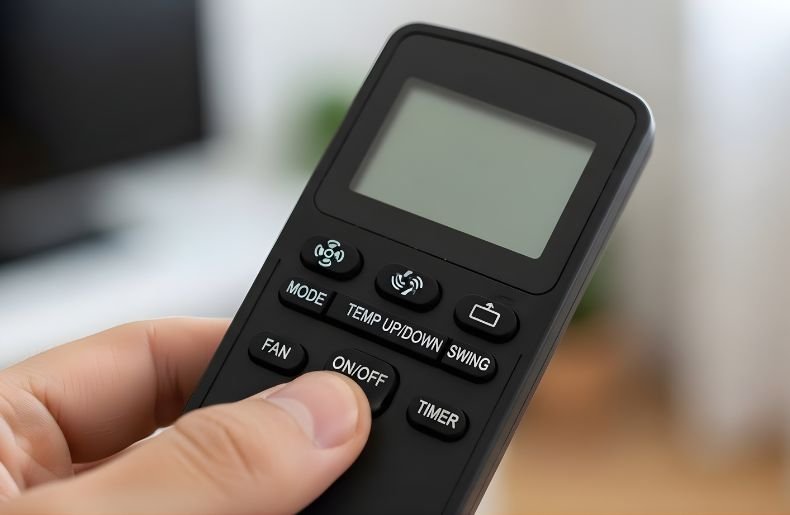
Did you ever face a situation where your AC remote works but display symbols are missing? I’ve personally gone through this issue, and it can be frustrating when you can’t see what mode or temperature you’ve selected.
At first, I thought the remote was broken. But surprisingly, all the buttons still worked perfectly fine. The only problem was that the display symbols were not visible.
This issue happens due to a faulty LCD screen, weak batteries, or internal damage. If you don’t take action quickly, there is a possibility of permanent damage to the display.
This article will help you to know why this happens and share some simple steps to fix it. So, why late? Just dig into this article.
Why Display Symbols Are Missing While AC Remote is Working
You AC remote words but display symbols are missing, right? Well, this is a common problem and it can be very frustrating.
The display symbols on an AC remote may be missing due to display damage, battery issues, or internal circuit faults.
Even though the remote sends signals to the AC unit, missing display symbols can make it hard to know what settings you’re using. Here are the most common reasons:

Weak or Drained Batteries
Low battery power is one of the most important reasons. In case of weak batteries, the remote can still transmit signals to the AC, yet the LCD screen lacks sufficient power to show the symbols as they should be.
LCD Screen Damage
If the AC remote was dropped or exposed to pressure, the LCD panel might be cracked internally. This prevents symbols from appearing, even though the buttons still function.
Loose Internal Connections
Inside the remote, the display screen connects to the circuit board through thin connections. If these connections loosen over time, the remote may work but fail to show symbols.
Moisture or Dust Build-Up
The clarity of the LCD screen may be disturbed by exposure to moisture or dust. This can lead to the diminishing or extinction of display symbols with time.
Old Remote Age
If the remote is too old, natural wear and tear may cause the LCD to fade. In such cases, replacing the remote might be the only solution.
How to Fix Display Symbols Missing Issues- Step by Step Guideline
The issue of fixing display symbols missing is not difficult. It only requires you to take a few easy steps. Here are the tips to fix this issue:
- Change Batteries: Change the batteries with new and good quality batteries to eliminate the power problem.
- Clean Battery Terminals: Clean all corrosion with cotton swab and vinegar.
- Check the Screen: Cracks or discolouration- in case of damage, change may be required.
- Reset the Remote: Take out the batteries, press all buttons at the same time (10 seconds) and put the batteries back.
- Casing: Open carefully: You can feel comfortable with checking to see that there are no loose connections inside.
- Test a Universal Remote: In case the problem still exists, a universal remote that is compatible can be an option.
Can I Still Use My AC Remote Without Display Symbols?
Yes, you can use your AC remote without display symbols, but it’s inconvenient and prone to errors since you can’t see which settings are active.
When your AC remote works but the display symbols are missing, it creates a frustrating experience. You’re pressing buttons, but you have no visual confirmation of what mode you’re in, what temperature you’ve set, or whether the timer is active.
Many users rely on muscle memory, pressing the same sequence of buttons daily. This can work if your settings never change, but it’s not reliable. You might accidentally switch to heating mode in summer or activate a timer without realizing it. These mistakes can lead to discomfort and energy waste.
In my experience helping users troubleshoot this issue, most people end up confused or annoyed. Some even think the AC unit itself is malfunctioning, when in reality, it’s just the remote display that’s faulty. Without symbols, even basic adjustments become guesswork.
If you’re in a pinch, you can still use the remote for essential functions like turning the AC on or off. But for precise control—like adjusting fan speed or switching between cool and dry modes—a working display is essential.
Ultimately, while it’s technically possible to use the remote, it’s not recommended for long-term use. You deserve full control over your comfort, and a remote with a clear display is key to that.
When Should You Replace the AC Remote Instead of Repairing It?
Replace your AC remote if the display issue is caused by internal damage, or if repair costs exceed the price of a new remote.
When your AC remote works but display symbols are missing, the first instinct is often to fix it. And that’s fair, sometimes a battery change or reset solves the problem. But if you’ve tried basic fixes and the screen remains blank or flickering, it’s time to consider replacement.
One major sign that repair isn’t worth it is internal circuit damage. If the remote has been dropped, exposed to water, or overheated, the internal board may be compromised. In such cases, even if the buttons work, the display won’t recover without professional intervention—which can be costly.
Another factor is age. If your remote is more than five years old, wear and tear may have degraded the screen or its connectors. Older remotes often suffer from faded displays or ghosting symbols, making them unreliable. At that point, replacement is usually more practical.
Universal remotes are a great alternative. They’re affordable, widely compatible, and often come with extra features like backlit screens or programmable settings. I’ve seen users switch to universal models and never look back. They’re simple, effective, and save time.
So, if your remote’s display is beyond repair or the cost of fixing it rivals buying a new one, go for a replacement. It’s a small investment for a big upgrade in convenience and control.
Final Thought
When your AC remote works but display symbols are missing, it’s a sign that something’s wrong beneath the surface. Although the remote can be operational, absence of symbols can cause confusion and wrong settings.
With finding out the root of the problem and just applying a few simple solutions, you can get the clarity back or understand when it is time to replace it. Thank you all for reading this article.
